New Release 18.08.14
Version 18.08.14 is now available for DOWNLOAD!
Unfortunately, the previous release 18.08.11 introduced a major regression that can corrupt project files if your project has clips where you had changed Speed in Properties. If you have a project file that no longer loads, you can fix it in a simple text editor:
- Open the .mlt file in a text editor (notepad.exe not recommended)
- Locate every line with
<property name="shotcut:comment">. - If the text that follows it on the same line before
</property>is incorrect or has strange characters, remove the text between the property tags. The line should now look like
<property name="shotcut:comment"></property>. - Save the file with a new name that ends with .mlt
- Try to load the repaired XML file.
New Release 18.08.11
Version 18.08.11 is now available for DOWNLOAD!
There have been enough major bugs found and fixed since the v18.08.01 release at the beginning of the month to warrant making a new release:
- Fixed new crash in v18.08 changing Settings > Video Mode with nothing opened.
- Fixed crash while adjusting position or size in Text and Size and Position filters.
- Fixed position and size information incorrect if resolution or aspect ratio changed in Export.
- Fixed Text animation (keyframes) when not the first clip in the timeline.
- Fixed track name not editable after the track head had been selected at least once.
- Fixed right-clicking a timeline clip breaks automatic timeline scrolling during playback.
- Added Quicktime Animation Export preset to export video with alpha channel.
- In Export, let option values in Other tab override values generated by other fields.
New Release 18.08.01
Version 18.08.01 is now available for DOWNLOAD!
This release primarily contains only bug fixes, which were strongly needed after a few releases with major additions and changes:
- Added the timecode of failure to the Jobs panel when an export job fails (makes locating problem areas in the project easier).
- Added an Unpremultiply Alpha video filter (handy to fix compositing for video clips with an alpha channel that has had its color pre-multiplied with its alpha).
- Fixed various crash regressions since v18.05.
- Fixed audio distortion during preview (regression in v18.07).
- Fixed custom Export presets broken if name contains parentheses (regression in v18.07).
- Fixed Properties > Reverse… broken if numeric region setting uses comma for decimal (regression in v18.07).
- Fixed Overlay HTML editor easily destroys default scripts (introduced in v18.07) if WebVfx JavaScript extension enabled.
- Fixed custom interlaced Export presets loading as progressive (regression in v18.07)
- Fixed Timeline > Copy Timeline to Source > Export fails on unsaved (Untitled) project.
- Fixed Text filter has aliased edges (regression in v18.07).
- Fixed Stabilize video filter not available on Linux (regression since v18.06).
- Fixed changing Speed in Properties breaks all filters on that clip (regression since v18.05).
- Fixed Fade Out Video (and keyframes in general) broken on still images whose in point is > 0 (regression since v18.03).
- Fixed accuracy of Properties > Duration for image clip on the timeline.
- Some fixes for changing Settings > Video Mode after starting a project.
- Fixed compositing of upper video tracks becomes broken if bottom video track is deleted.
- Fixed images with alpha channel (e.g. PNG) on upper video tracks have dark edges after compositing if the Size and Position or Rotate and Scale filters are not used.
New Release 18.07
Version 18.07 is now available for DOWNLOAD!
Here are the main fixes and enhancements in this new version:
- Numerous fixes as usual.
- Changed shortcut for Add Video Track to
Ctrl+I(Cmd+Ion macOS). - Changed shortcut for Redo to
Ctrl+Yon Windows. - Added 10% to the player zoom menu.
- Hide the VUI (video user interface) when the play head is not over the clip with the current filter.
- Renamed the Rotate filter to Rotate and Scale.
- Keyframes are now saved in the project file using time clock values instead of frame numbers to make them adaptive to frame rate.
- Reverted memory manager change from v18.05 pending further testing to improve stability.
- Added advanced keyframes to the Size and Position filter.
- Added simple and advanced keyframes to the following video filters:
- Rotate and Scale
- Text
- Glow*
- Contrast*
- Sharpen*
- Vignette*
* = including the (still experimental) GPU filter
- Added Copy Timeline to Source to Timeline menu.
- Changed the audio codec to AC-3 for the edit-friendly and reverse MP4 file format.
- Changed
JandKkey behavior to change speed up or down before changing direction. - Added categories to the Export presets (custom presets can start their name with “category)” to use a category).
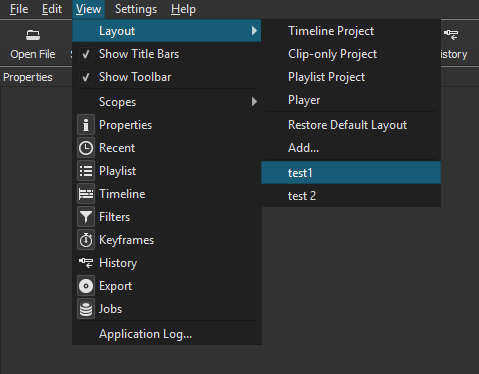
- Added View > Layout menu for custom and stock layouts:
- Timeline Project
- Playlist Project
- Clip-only Project
- Player
- Changed the default, first-time user UI layout to Timeline Project.
- Changed Properties > menu > Reverse… to work on a trimmed clip from either Source or Timeline.
- Added Properties menu items to the context menus for Timeline and timeline clips.
- Added logic to sort GoPro files when multiple files are opened or dropped.
- Added support for setting project file name (using File > Save) for empty project.
- Added new HTML template for WebVfx JavaScript extensions enabled in Overlay HTML video filter.
- Added search field to the filter chooser in Filters.
- Upgraded MLT to v6.10.0
Below is a screenshot showing the new View > Layout menu.
New Version 18.06: Reverse, Detach, and Double-click
UPDATE: Version 18.06 has been re-released (build 18.06.02) to fix a new crash bug that was discovered.
Version 18.06 is now available for DOWNLOAD!
Not only did the previous version (18.05) introduce major features and changes but also many new bugs. Let’s just call that release a “technology preview.” We paid a lot of attention to the feedback and fixed most of the problems for this version. But that’s not all! Take a look at this:
- Added Reverse to clip Properties menu.
- Added Detach Audio to timeline clip’s context menu.
- Added simple and advanced Keyframes to the Blur, Mask, and Saturation filters.
- Added seek buttons for simple Keyframes.
- Added ability to add and remove advanced Keyframes using double-click.
- Added ability to drag advanced Keyframes to adjust both value and position.
(When dragging, hold down Ctrl key to adjust only value or Alt key to adjust only position.) - Added double-click to toggle simple Keyframes controls (circles).
- Added double-click to toggle fade in/out controls on Timeline clip.
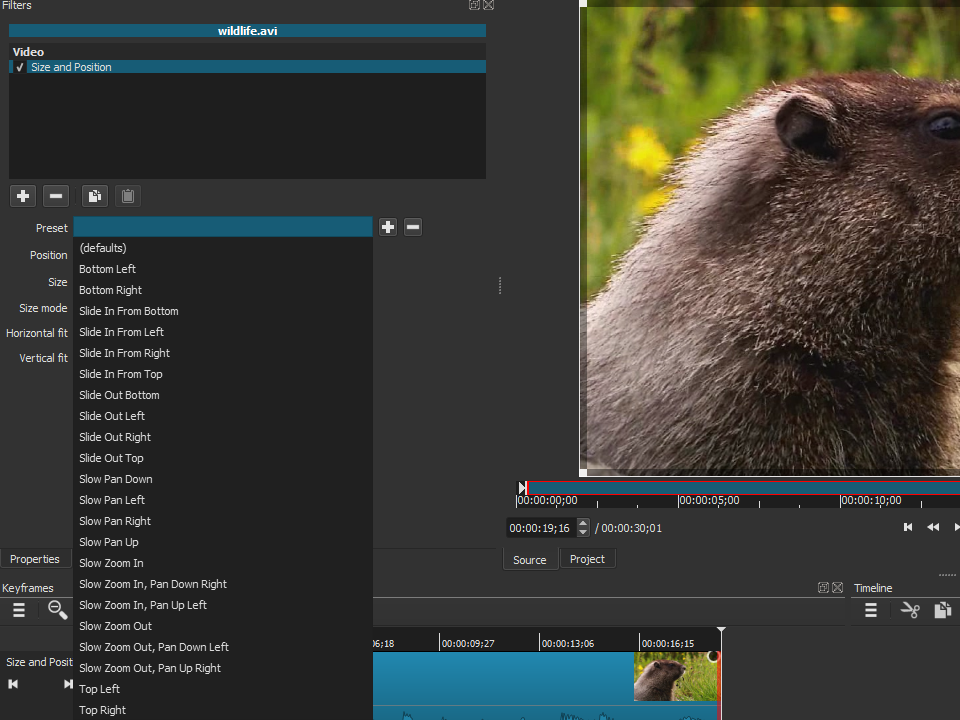
- Added many animated (keyframes) presets to the Size and Position filter.
- Added Hue/Lightness/Saturation video filter.
- Added 5.1 surround support to the Copy Channel and Swap Channels audio filters.
- Added caution message to GPU Effects confirmation dialog.
- Added a Keyboard Shortcuts link to the Help menu.
- Changed presets file format to YAML.
- Changed Settings > GPU Processing to GPU Effects.
- Reduced memory usage on 32-bit builds (by constraining multi-threading).
- Upgraded FFmpeg to v4.0.
- Integrated AMD AMF hardware-accelerated H.264 and HEVC encoders on Windows (Set Export > Codec to h264_amf or hevc_amf. Requires recent Radeon or AMD APU.)
- Upgraded MLT to git master (v6.8.0 minimum required to build).
Search
Recent Posts
- Posted on 27 Sep 2026
- Posted on 01 Aug 2026
- Posted on 25 Jun 2026
- Posted on 29 Apr 2026