New Version 19.07
Version 19.07 is now available for DOWNLOAD!
This version is mostly just bug fixes and minor improvements.
Changes and Improvements
- Changed Average Bitrate for libopus audio codec to set vbr to constrained.
- Changed Crop: Source to use the source clip’s resolution as maximum for parameters.
- Changed the Convert to Edit-friendly and Reverse “better” option from ProRes to DNxHR, which is faster.
- Changed the Convert to Edit-friendly and Reverse “best” option from FFV1 to Ut Video, which is faster.
- Improved full range handling in Convert to Edit-friendly and Reverse by respecting an override in Properties > Color Range.
- Improved detection of full range color in video clips.
- Changed ripple move on the Timeline to push the clips when the drop zone is a gap.
- Added “ - Converted” into the suggested file name when using Properties > Convert to Edit-friendly…
- Added a status message at the start of opening a project.
- Added a drop-down of common frame rates to Export and Custom Video Mode.
- Added a dialog to ask if the standard, fractional frame rate was intended in Export and Custom Video Mode.
- Added a HD 1080p 50 fps video mode.
Fixes
- Fixed Timer video filter shows incorrect decimals.
- Fixed clips that become INVALID were saved as uneditable text clips.
- Fixed a crash in Wave video filter.
- Fixed a crash when changing clip Speed to something very low.
- Fixed long Projects folder path in the New Project view.
- Fixed the temporary backup file is empty when saving MLT XML.
- Fixed saving existing project on Dropbox gives an error.
- Fixed advanced keyframes removed when trimming.
- Fixed loading the frame rate from an export preset.
- Fixed multiple Stabilize video filter analysis jobs may try to write to the same .stab file.
- Fixed reported timecode of failed Export job if (Frames/sec is not 25 or not changed in Advanced > Video).
- Fixed incorrect audio waveform after Undo after insert/paste into Timeline.
- Fixed filters added to a clip with a transition are not the correct length and not active during the transition.
- Fixed Blur: Gaussian filter makes bottom 3 rows of the image with black or garbage.
- Fixed help text in the New Project view may be truncated without scroll bar.
- Fixed Crop: Circle > Radius = 100% not completely extended.
- Fixed loading image sequences that do not put leading zeroes into their number (bug introduced in v19.06).
New Version 19.06
Version 19.06 is now available for DOWNLOAD!
Changes and Improvements
Project Files
This version makes a big change to the way project files are saved. Now, they always save numeric values using a period for the decimal point regardless of your OS locale (region/language) setting. This makes it possible to collaborate with others that have a different decimal point setting without going through a (probably incomplete) repair process. This should also help to avoid bugs. This change applies to new projects only; old projects load and run same as before including saving. However, be aware that if your locale does not use a period for the decimal point, then older versions of Shotcut will try to repair a project created with this version because the older versions do not have this new capability.
Timeline and Keyframes Rulers
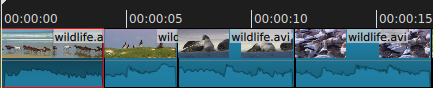
We changed the Timeline and Keyframes rulers interval to 5 seconds and show only HH:MM:SS and no frame units. This makes them cleaner and quicker to read.
Reorganized Some Video Filters
- Renamed video filter Circular Frame to Crop: Circle.
- Renamed video filter Crop to Crop: Source.
- Renamed video filter Text to Text: Simple.
- Renamed video filter 3D Text to Text: 3D.
- Renamed video filter Overlay HTML to Text: HTML.
- Renamed video filter Blur to Blur: Box.
- Renamed Reduce Noise video filter to Reduce Noise: Smart Blur.
Other Changes
- Changed Export > From to show Source instead of base file name.
- Changed the default for Settings > Display Method back to DirectX on Windows.
- Changed maximum duration of Color, Text, and Color Bars clips to 4 hours.
- Increased maximum value of the Timer filter’s Start Delay, Duration, and Offset parameters to 24 hours.
- Improved Export Job progress and estimated time remaining.
New Features
Blur Filters
In the previous versions of Shotcut the Blur video filter could create dark edges on the image. Therefore, 3 new blur filters were added that do not have this problem:
- Blur: Exponential (fast)
- Blur: Low Pass (fast)
- Blur: Gaussian (slow)
However, they do not support Keyframes or support blurring in only a horizontal or vertical direction. So, the existing blur filter was retained but renamed Blur: Box.
Main Toolbar
The previous version changed the appearance of the toolbar to address a high density (DPI) issue on Linux. However, that made the icons larger for most people. Also, some people would simply hide the main toolbar since it took up so much space. Now, there are two new options in the View menu:
- Show Text Under Icons (default on)
- Show Small Icons (default off)

Additionally:
- Added Jobs to the main toolbar.

- Reordered panel buttons on main toolbar to match View menu.
Alpha Channel Support for HTML-based Filters
Shotcut can use HTML technologies for video effects, but previously it was limited at support the existing image or video’s alpha channel (transparency mask) and would always overwrite it with its own alpha channel, which often times was opaque. For example, this prevented maintaining transparency when using 3D text on a transparent color clip. Now, it supports the alpha channel. Using this, we have new Crop video filters.
Crop Filters
Previous versions of Shotcut’s Crop filter did not behave as some expected because it removes pixels from the edges of the source and thus changes its aspect ratio. Still, it can be useful when working with sources with a higher resolution than the project because it does not require one to crop and then upscale to remove black bars. Therefore, the existing crop filter was renamed to Crop: Source, and two new crop filters were added using HTML.
- Crop: Circle
- Crop: Rectangle
These two new crop filters can use the HTML alpha channel support by changing the alpha component of their Color parameter. This is very useful when using Crop: Rectangle or Crop: Circle while compositing video tracks.
More New Things
- Added Ripple All button to Timeline toolbar.

- Added a vertical Flip video filter.
- Added Reduce Noise: HQDN3D video filter.
- Added Noise: Fast video filter.
- Added Noise: Keyframes video filter.
- Added Add Keyframe button in Keyframes (only on parameters that show a
curve UI).

- Added keyboard shortcuts Ctrl+0-9 to toggle the panels.
- Added Alt 0/+/- shortcuts to adjust the zoom in Keyframes.
- Added Swedish translation.
Fixes
- Fixed deleting the project file if there was a save error.
- Fixed reliability of Settings > Display Method > Software on Windows.
- Fixed Crop: Source filter not working with Color clip.
- Fixed using filters on Color Bars and other generator clips.
- Fixed audio filters (Compressor, Expander, Limiter, Notch, Reverb) broken
on comma for decimal. - Fixed alpha video opaque on gaps in Timeline.
- Fixed Convert to Edit-friendly and Reverse if there is no audio track.
- Fixed Measure Video Quality broken.
- Fixed Alpha: Adjust > Invert checkbox on reload.
- Fixed color eye-dropper (picker) error.
- Fixed audio Pan filter channel resets on reload.
- Fixed a crash using Mirror filter before Rotate and Scale or Size and Position.
- Fixed poor Reverse audio quality for mp4 and mkv options.
- Fixed the Simple Scroll HTML template may not scroll up or left completely.
New Version 19.04: Fun New Video Effects
Version 19.04 is now available for DOWNLOAD!
This version is the usual roundup of recent fixes and minor feature additions. The development team especially thanks forum members @Paul2, @sauron, and @DRM for their contributions to this release.
New Features
- Added (creation) Date column to Playlist Details view.
- Added Set File Date… to the Playlist menu and item context menu.
- Added Sort By Name and Sort By Date to the Playlist menu.
These are single-shot sorting commands. The playlist is still fixed-ordering. The new options do not automatically sort new playlist entries. - Added new video filters:
- Grid
- Audio Dance Visualization
- Audio Light Visualization
- RGB Shift
- Glitch
- Distort
- Added Zoom 300%, 400%, 500%, 750%, and 1000% to the player’s zoom menu.
- Added Settings > Drawing Method > Software (Mesa) on Windows.
This is not good for performance, but it improves compatibility. Use only as a last resort. - Added Display Method > OpenGL or Software (Mesa) on Linux.
- Added Norwegian Nynorsk translation.
Fixes
- Fixed reading some AVCHD files after a camcorder splits.
- Cosmetic fixes for timecode spinner and toolbar icons on high DPI systems.
- Bundled libnsl for Linux to fix Fedora.
- Fixed Video Waveform scope graticule not showing on non-dark theme.
- Fixed incorrect compositing z-order after Insert Track.
- Fixed cosmetic problem with main toolbar using System theme on macOS.
- Fixed current track changes after inserting or overwriting a clip in Timeline.
- Fixed absolute paths can be introduced on Windows when using a project folder.
- Fixed sometimes showing forward slashes for file paths on Windows.
- Fixed first clip does not start at beginning when drop to Timeline after File > New or File > Close.
- Fixed Properties > Convert and Reverse on files with album art or embedded thumbnail.
- Fixed a possible crash on File > New or File > Close.
- Fixed filters on clips not extended into transition when adding a transition by trimming or resizing a transition.
- Fixed Open Other > ALSA Audio on toolbar on Linux.
- Fixed changing Properties > Speed or Color Range on a timeline clip may crash.
- Fixed timeline correction when drag clip to another track and then back to original.
- Fixed reloading the Mask: From File filter resets Threshold keyframes.
- Fixed the Mask: Simple Shape filter does not work when Width or Height is 0%.
Changes and Improvements
- Increased parameter ranges in the Rotate and Scale filter.
- Added verification that saved MLT XML is well-formed XML before (over-)writing the target file.
- Changed default Outline Thickness (3) and alpha of Text filter to match Open Other > Text and prevent a problem where the text outline is aliased when the clip is transparent.
- Changed the version check to use HTTPS for increased privacy.
- Added DLL redirection files for other .exe programs on Windows to prioritize Shotcut-provided DLLs over those in system or $path.
- Removed the buggy Merge with next clip from Timeline clip context menu.
New Version 19.02: Qt Upgrade and HTTPS
Version 19.02 is now available for DOWNLOAD!
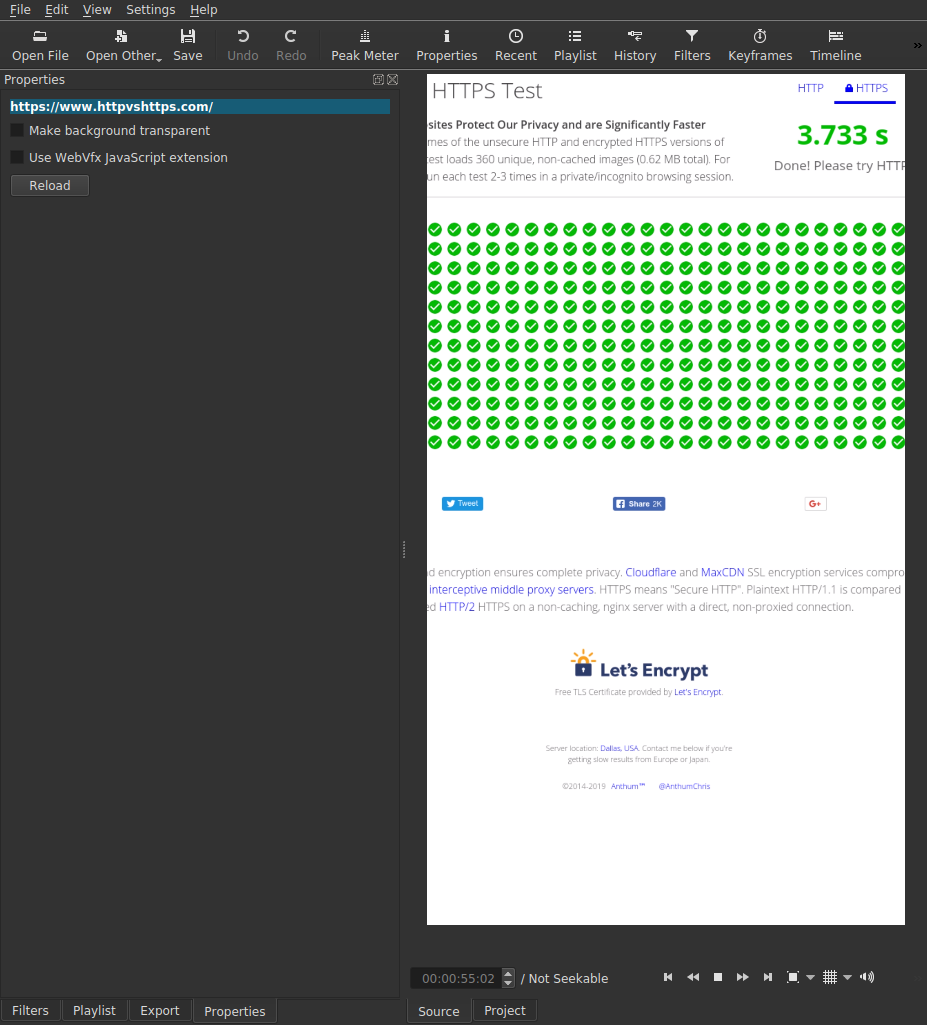
The main announcement for this release is a major update to an important library that Shotcut uses for the UI (user interface) called Qt. There have 6 major releases and two LTS (long term support) releases since the version we were using. The new version we are using is Qt 5.9.7, which is LTS (5.9) and is quite stable given the number of revisions (.7). It is a little faster as well. We did not upgrade to the latest LTS (5.12) in order to retain compatibility with macOS 10.10 and 10.11, and we want to use the same Qt version across platforms. (Linux Flatpak is an exception.) With our new Qt builds, we added support for HTTPS, which extends to our HTML effects based on WebVfx and QtWebKit. This will let custom HTML titles and effects that you make link to JavaScript libraries on the Web, which is mostly HTTPS now.
New Features
- Added Offset to the Timer video filter.
- Added Vertical HD 30 fps and Vertical HD 60 fps video modes.
- Added support for HTTPS.
- Added
--QT_SCALE_FACTORand--QT_SCREEN_SCALE_FACTORScommand line options. - Added English (Great Britain) translation.
Fixes
- Fixed opening image sequence on Windows with extended/special characters in file path/name.
- Fixed crash on some video clips, particularly those with Google Pixel 3 and likely others.
- Fixed field order with interlaced export.
- Fixed an image artifact when using keyframes with the Mask: Simple Shape filter.
- Fixed image and alpha channel integrity with transitions on clips with a non-opaque alpha channel.
- Fixed a crash when changing clip Properties > Audio > Track.
- Fixed Properties > Video > Color Range inaccurate after changing it.
- Fixed Shake One Second presets in regions that use comma for decimal point.
- Fixed moving a Playlist item to the end.
- Fixed more dialogs to be modal to prevent them from going behind the main window.
- Fixed Overlay HTML webvfx templates when using a project folder.
- Fixed volume slider appears before main window at launch on macOS.
- Fixed more dialogs to use sheet style on macOS.
- Fixed a few small memory leaks in MLT.
Changes and Improvements
- Upgraded Qt to version 5.9.7.
- Changed Width and Height minimum to 0 for Blur filter.
- Set the Save as type list on all file save dialogs (convert, reverse, text, EDL, image).
- Improved the quality of Export Frame > WebP.
- Show “Not Seekable” instead of “Live” when opening a non-seeable clip (or device or stream).
- Show a status message when trying to drag from Project player.
- Prefer loading DLLs in Shotcut’s install folder over those in System32.
- Default the out point of the Color, Count, and Text generator clips to the same as image duration (default 4 seconds).
New Version 19.01: HTML Templates, Chroma Hold, & Swirl
Version 19.01 is now available for DOWNLOAD!
Much of this release was based on contributions in the form of code, presets, title templates, feedback, bug reports, and testing nightly builds or the beta. Also, recently, we added a Contribute page to the Web site.
New Features
- Added Center Playhead option to the Timeline and Keyframes menus.
- Added Slow Zoom __, Hold __ presets to the Size and Position filter.
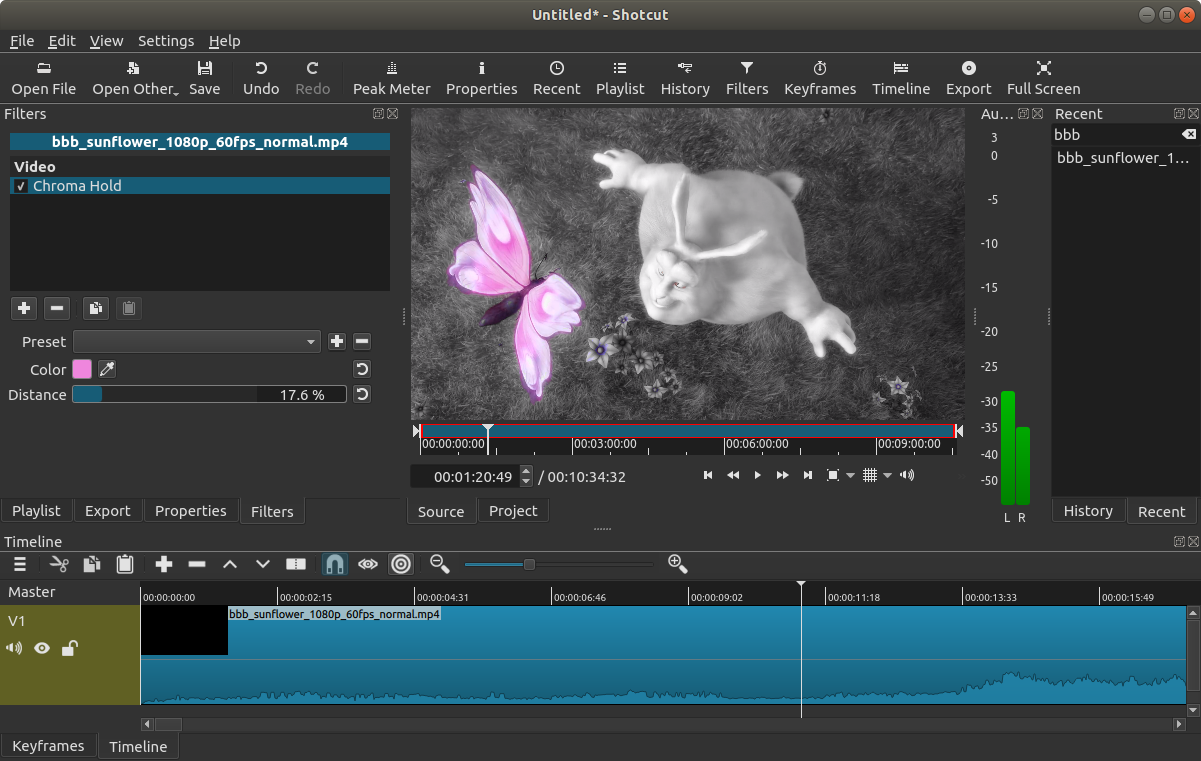
- Added a Chroma Hold video filter.
- Added a Swirl (HTML) video filter.
- Added a simple Templates framework to the Overlay HTML filter (see
path
Shotcut\share\shotcut\qml\filters\webvfx\templatesto add your own) with the following templates:- Blank HTML
- Blue Middle Bar
- Creative Commons Music
- Blank with Web Animations
- Simple Scroll
Fixes
- Fixed launch crash on Linux by excluding libdrm libraries.
- Fixed audio level changed by the Mask : From File filter.
- Fixed Text filter may have glitches with Export > Parallel processing (regression in v18.12.x).
- Fixed missing file detected when Stabilize filter added without clicking Analyze.
- Fixed external monitoring on Linux screen.
- Fixed unable to detect hardware encoders with spaces in the installation folder path.
- Fixed changing Speed can move a clip.
- Fixed changing Speed has no effect when the system region and language decimal separators are different.
- Fixed filter duration not adjusted when trimming a transition.
- Fixed ripple trim when clip has a transition.
- Fixed removing a transition by trimming adds some frames.
- Fixed aspect ratio for File > Export Frame with non-square pixel video.
- Fixed handling relative paths to external resources in the Overlay HTML editor.
- Fixed a crash opening a project after removing the bottom video track.
- Fixed the lossless/H.264 preset to be completely lossless.
- Fixed dropping a file from a file manager whose name has special/extended
characters (e.g.
[,]). - Fixed the state of the enabled checkbox for the Overlay HTML filter and when using a color picker.
- Fixed distortion after changing the Keyframe Type of a keyframe for the Scale parameter in the Rotate and Scale filter.
- Fixed right-clicking a keyframe to open context menu may change its position.
- Fixed distortion when a Mirror filter is placed before a Size and Position or Rotate and Scale filter.
- Fixed Levels filter in locales with comma for decimal point.
Changes and Improvements
- Upgraded FFmpeg to v4.1
- Improved Color Grading filter by letting all parameters go from -100% to 100%.
- Added an automatic retry without Parallel processing when Export job fails.
- Set the Save as type list on the Export File dialog on Windows when a preset defines a filename extension.
Search
Recent Posts
- Posted on 27 Sep 2026
- Posted on 01 Aug 2026
- Posted on 25 Jun 2026
- Posted on 29 Apr 2026